> For the complete documentation index, see [llms.txt](https://docs.flydean.com/www.flydean.com/llms.txt). Markdown versions of documentation pages are available by appending `.md` to page URLs; this page is available as [Markdown](https://docs.flydean.com/www.flydean.com/docs/java/3-concurrent/09-concurrent-thread-lifecycle.md).
# 9. java中线程的生命周期
线程是java中绕不过去的一个话题, 今天本文将会详细讲解java中线程的生命周期,希望可以给大家一些启发。
## java中Thread的状态
java中Thread有6种状态,分别是:
1. NEW - 新创建的Thread,还没有开始执行
2. RUNNABLE - 可运行状态的Thread,包括准备运行和正在运行的。
3. BLOCKED - 正在等待资源锁的线程
4. WAITING - 正在无限期等待其他线程来执行某个特定操作
5. TIMED\_WAITING - 在一定的时间内等待其他线程来执行某个特定操作
6. TERMINATED - 线程执行完毕
我们可以用一个图来直观的表示:
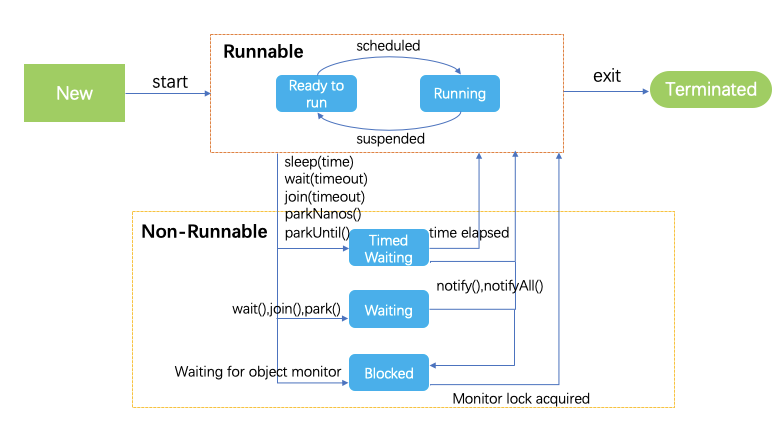
JDK代码中的定义如下:
```java
public enum State {
/**
* Thread state for a thread which has not yet started.
*/
NEW,
/**
* Thread state for a runnable thread. A thread in the runnable
* state is executing in the Java virtual machine but it may
* be waiting for other resources from the operating system
* such as processor.
*/
RUNNABLE,
/**
* Thread state for a thread blocked waiting for a monitor lock.
* A thread in the blocked state is waiting for a monitor lock
* to enter a synchronized block/method or
* reenter a synchronized block/method after calling
* {@link Object#wait() Object.wait}.
*/
BLOCKED,
/**
* Thread state for a waiting thread.
* A thread is in the waiting state due to calling one of the
* following methods:
*
* - {@link Object#wait() Object.wait} with no timeout
* - {@link #join() Thread.join} with no timeout
* - {@link LockSupport#park() LockSupport.park}
*
*
* A thread in the waiting state is waiting for another thread to
* perform a particular action.
*
* For example, a thread that has called Object.wait()
* on an object is waiting for another thread to call
* Object.notify() or Object.notifyAll() on
* that object. A thread that has called Thread.join()
* is waiting for a specified thread to terminate.
*/
WAITING,
/**
* Thread state for a waiting thread with a specified waiting time.
* A thread is in the timed waiting state due to calling one of
* the following methods with a specified positive waiting time:
*
* - {@link #sleep Thread.sleep}
* - {@link Object#wait(long) Object.wait} with timeout
* - {@link #join(long) Thread.join} with timeout
* - {@link LockSupport#parkNanos LockSupport.parkNanos}
* - {@link LockSupport#parkUntil LockSupport.parkUntil}
*
*/
TIMED_WAITING,
/**
* Thread state for a terminated thread.
* The thread has completed execution.
*/
TERMINATED;
}
```
## NEW
NEW 表示线程创建了,但是还没有开始执行。我们看一个NEW的例子:
```java
public class NewThread implements Runnable{
public static void main(String[] args) {
Runnable runnable = new NewThread();
Thread t = new Thread(runnable);
log.info(t.getState().toString());
}
@Override
public void run() {
}
}
```
上面的代码将会输出:
```txt
NEW
```
## Runnable
Runnable表示线程正在可执行状态。包括正在运行和准备运行两种。
为什么这两种都叫做Runnable呢?我们知道在多任务环境中,CPU的个数是有限的,所以任务都是轮循占有CPU来处理的,JVM中的线程调度器会为每个线程分配特定的执行时间,当执行时间结束后,线程调度器将会释放CPU,以供其他的Runnable线程执行。
我们看一个Runnable的例子:
```java
public class RunnableThread implements Runnable {
@Override
public void run() {
}
public static void main(String[] args) {
Runnable runnable = new RunnableThread();
Thread t = new Thread(runnable);
t.start();
log.info(t.getState().toString());
}
}
```
上面的代码将会输出:
```txt
RUNNABLE
```
## BLOCKED
BLOCKED表示线程正在等待资源锁,而目前该资源正在被其他线程占有。
我们举个例子:
```java
public class BlockThread implements Runnable {
@Override
public void run() {
loopResource();
}
public static synchronized void loopResource() {
while(true) {
//无限循环
}
}
public static void main(String[] args) throws InterruptedException {
Thread t1 = new Thread(new BlockThread());
Thread t2 = new Thread(new BlockThread());
t1.start();
t2.start();
Thread.sleep(1000);
log.info(t1.getState().toString());
log.info(t2.getState().toString());
System.exit(0);
}
}
```
上面的例子中,由于t1是无限循环,将会一直占有资源锁,导致t2无法获取资源锁,从而位于BLOCKED状态。
我们会得到如下结果:
```txt
12:40:11.710 [main] INFO com.flydean.BlockThread - RUNNABLE
12:40:11.713 [main] INFO com.flydean.BlockThread - BLOCKED
```
## WAITING
WAITING 状态表示线程正在等待其他的线程执行特定的操作。有三种方法可以导致线程处于WAITTING状态:
1. object.wait()
2. thread.join()
3. LockSupport.park()
其中1,2方法不需要传入时间参数。
我们看下使用的例子:
```java
public class WaitThread implements Runnable{
public static Thread t1;
@Override
public void run() {
Thread t2 = new Thread(()->{
try {
Thread.sleep(10000);
} catch (InterruptedException e) {
Thread.currentThread().interrupt();
log.error("Thread interrupted", e);
}
log.info("t1"+t1.getState().toString());
});
t2.start();
try {
t2.join();
} catch (InterruptedException e) {
Thread.currentThread().interrupt();
log.error("Thread interrupted", e);
}
log.info("t2"+t2.getState().toString());
}
public static void main(String[] args) {
t1 = new Thread(new WaitThread());
t1.start();
}
}
```
在这个例子中,我们调用的t2.join(),这会使调用它的t1线程处于WAITTING状态。
我们看下输出结果:
```java
12:44:12.958 [Thread-1] INFO com.flydean.WaitThread - t1 WAITING
12:44:12.964 [Thread-0] INFO com.flydean.WaitThread - t2 TERMINATED
```
## TIMED\_WAITING
TIMED\_WAITING状态表示在一个有限的时间内等待其他线程执行特定的某些操作。
java中有5中方式来达到这种状态:
1. thread.sleep(long millis)
2. wait(int timeout) 或者 wait(int timeout, int nanos)
3. thread.join(long millis)
4. LockSupport.parkNanos
5. LockSupport.parkUntil
我们举个例子:
```java
public class TimedWaitThread implements Runnable{
@Override
public void run() {
try {
Thread.sleep(5000);
} catch (InterruptedException e) {
Thread.currentThread().interrupt();
log.error("Thread interrupted", e);
}
}
public static void main(String[] args) throws InterruptedException {
TimedWaitThread obj1 = new TimedWaitThread();
Thread t1 = new Thread(obj1);
t1.start();
// The following sleep will give enough time for ThreadScheduler
// to start processing of thread t1
Thread.sleep(1000);
log.info(t1.getState().toString());
}
}
```
上面的例子中我们调用了Thread.sleep(5000)来让线程处于TIMED\_WAITING状态。
看下输出:
```txt
12:58:02.706 [main] INFO com.flydean.TimedWaitThread - TIMED_WAITING
```
那么问题来了,TIMED\_WAITING和WAITTING有什么区别呢?
TIMED\_WAITING如果在给定的时间内没有等到其他线程的特定操作,则会被唤醒,从而进入争夺资源锁的队列,如果能够获取到锁,则会变成Runnable状态,如果获取不到锁,则会变成BLOCKED状态。
## TERMINATED
TERMINATED表示线程已经执行完毕。我们看下例子:
```java
public class TerminatedThread implements Runnable{
@Override
public void run() {
}
public static void main(String[] args) throws InterruptedException {
Thread t1 = new Thread(new TerminatedThread());
t1.start();
// The following sleep method will give enough time for
// thread t1 to complete
Thread.sleep(1000);
log.info(t1.getState().toString());
}
}
```
输出结果:
```txt
13:02:38.868 [main] INFO com.flydean.TerminatedThread - TERMINATED
```
本文的例子可以参考
更多教程请参考 [flydean的博客](http://www.flydean.com)